How to Check Your Globe SIM Registration Status
Last checked: October 27, 2026, against Globe’s official SIM registration pages. Independent guide, not affiliated with Globe Telecom.
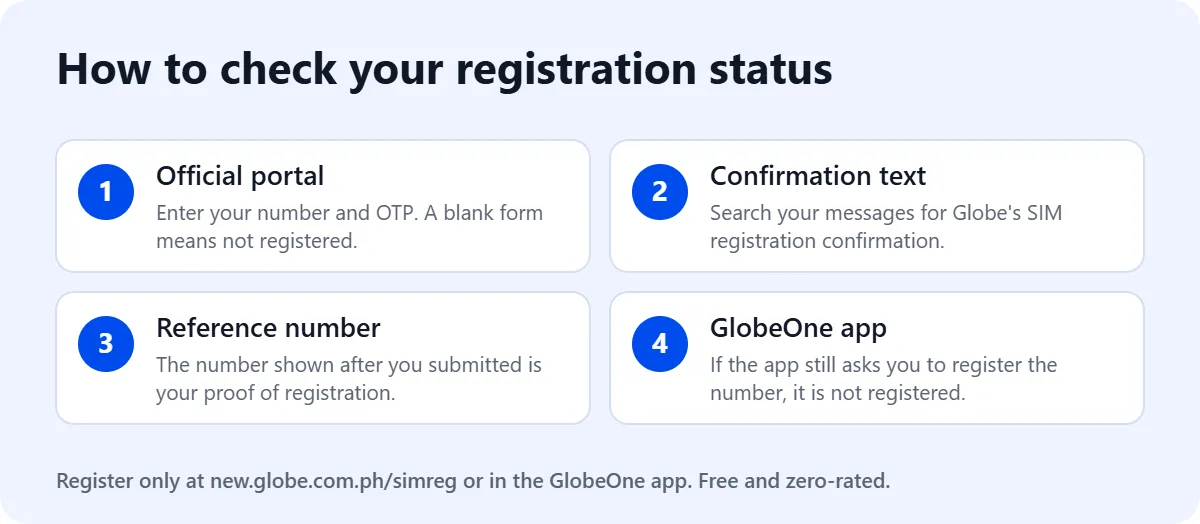
Quick answer: Globe’s own help page says the way to check is to visit the official Globe SIM registration portal and enter your number. You can also confirm registration by finding Globe’s confirmation text and the reference number shown on screen when you submitted your registration.
This guide is part of our main Globe SIM registration guide. It works for Globe Prepaid, TM, Globe At Home Prepaid WiFi and Globe Mobile WiFi numbers.
Before you check: what you need
- The SIM inserted in a phone or device that can receive text messages, because the portal sends a one-time PIN (OTP) to that SIM.
- Your 10-digit mobile number without the leading 0 (for example 9171234567). If you do not know it, see how to check your Globe number.
- An internet connection. Globe says its registration site is zero-rated, so the SIM’s own mobile data works even with no load.
Method 1: Check on the official Globe portal
- Keep the SIM in a phone that can receive text messages.
- Open the official portal at new.globe.com.ph/simreg.
- Enter your 10-digit mobile number and continue.
- Enter the 6-digit OTP sent to the SIM. It expires after 5 minutes.
- Read what the portal shows. If it opens a blank registration form, your SIM is not registered yet, so complete the form now.
If the OTP does not arrive, check that the SIM has signal, then tap Resend OTP. If the page does not load, double-check the web address and your connection.
Method 2: Find your confirmation text and reference number
When a registration is completed, Globe shows a reference number on screen and sends a confirmation text. Search your messages for “SIM registration” or “reference number”. If you saved a screenshot of the reference number, keep it: Globe treats it as your proof of registration.
Method 3: Check in the GlobeOne app
Globe also handles registration in the GlobeOne app, where you tap Register Now and select your account or number. If the app still asks you to register a number, finish the registration there. New to the app? See our GlobeOne app guide.
What your result means
| What you see | What it means | What to do |
|---|---|---|
| Confirmation text and reference number | Registered | Keep the reference number; keep loading so the SIM does not expire |
| Portal opens a blank registration form | Not registered | Complete the form now |
| No OTP arrives | Not yet known | Check signal and inbox space, then tap Resend OTP |
| You submitted but got no confirmation text | Not yet known | Check again on the portal; if unclear, contact Globe |
Checking a pocket WiFi or home WiFi number
Devices without a screen for texts need an extra step to read the OTP.
- Globe Mobile WiFi (MyFi): connect your phone to the device, open a browser, go to 192.168.8.1 and log in with the username and password from the manual or the back of the device. The OTP and Globe’s messages arrive in the SMS or device inbox there.
- Globe At Home Prepaid WiFi: registration runs through the GlobeOne app, where you enroll the Prepaid WiFi number printed on the modem. If the app still offers “Register your SIM now” for that number, it is not registered yet.
If your SIM is not registered yet
Register it right away; a new SIM does not work until you do. You need your details exactly as printed on one valid government ID, a selfie, and a photo of the ID. Globe’s current list of accepted IDs is the Passport, Driver’s License, National ID, BIR or TIN ID, UMID, PhilPost Postal ID, SSS ID and PRC ID. The full walkthrough is on our Globe SIM registration guide, and TM users can follow the TM SIM registration guide.
Postpaid and Platinum users
Globe says data you gave when applying for a postpaid plan is already in its system, and it may contact you to confirm your details. When Globe texts you, reply SIMREG to 8080 to confirm, and you will receive a confirmation message. To change your details, Globe asks postpaid customers to visit a Globe Store.
Common mistakes when checking
- Typing 11 digits. The portal asks for 10 digits, so leave out the leading 0.
- Checking with the SIM in another phone. The OTP goes to the SIM itself, so it must be in the device you are holding or one you can read messages from.
- Using a look-alike website. Check the address bar for new.globe.com.ph before you type your number.
- Waiting too long. An OTP older than five minutes is rejected. Request a new one.
Registered, but your SIM stopped working?
Registration and expiry are different. Globe states that registering does not stop a prepaid SIM from expiring; you still need to reload regularly. Learn more about the law behind registration in our SIM Registration Act guide, and check your remaining load with our Globe balance guide. If mobile data is the only thing not working, review your Globe APN settings.
Frequently asked questions
Is there a dial code to check Globe SIM registration?
Globe’s official pages do not list a dial code for this. Use the official portal, your confirmation text, or the GlobeOne app.
Can I check someone else’s registration?
The portal sends an OTP to the SIM itself, so you need that SIM in hand. This protects the owner’s personal data.
I have several Globe SIMs. Do I check each one?
Yes. Globe requires each SIM to be registered separately under your name, so check and register each number on its own.
Does checking my status cost load?
No. Globe says its online registration site is free and zero-rated.